More Than a Website: A Camp Management Platform for International Futbol Sports
International Futbol Sports ran three summer camps on a WordPress site, paper forms, mailed checks and spreadsheets. We built the platform the office now runs the season on, and the site parents register through.

- Industry
- Youth Soccer Camps (grades 1 to 12)
- Location
- Bucks County and the Lehigh Valley, PA
- Timeline
- July to October 2026
- Services
- Custom Platform, Website Development, Online Payments, Data Migration, Email
The Challenge
International Futbol Sports runs three summer camps: Youth Development and Varsity Development at Delaware Valley University, and a Boys Residential camp at DeSales University. Owner and Director of Camps Matt Sirolli runs it with Technical Director Michael Gorni.
Registration ran through forms on a WordPress site. Parents paid a deposit online and mailed a check for the balance. The waiver, code of conduct and medical form were all on paper. The office tracked everything in spreadsheets and chased families one by one for missing forms and checks.
The camp needed:
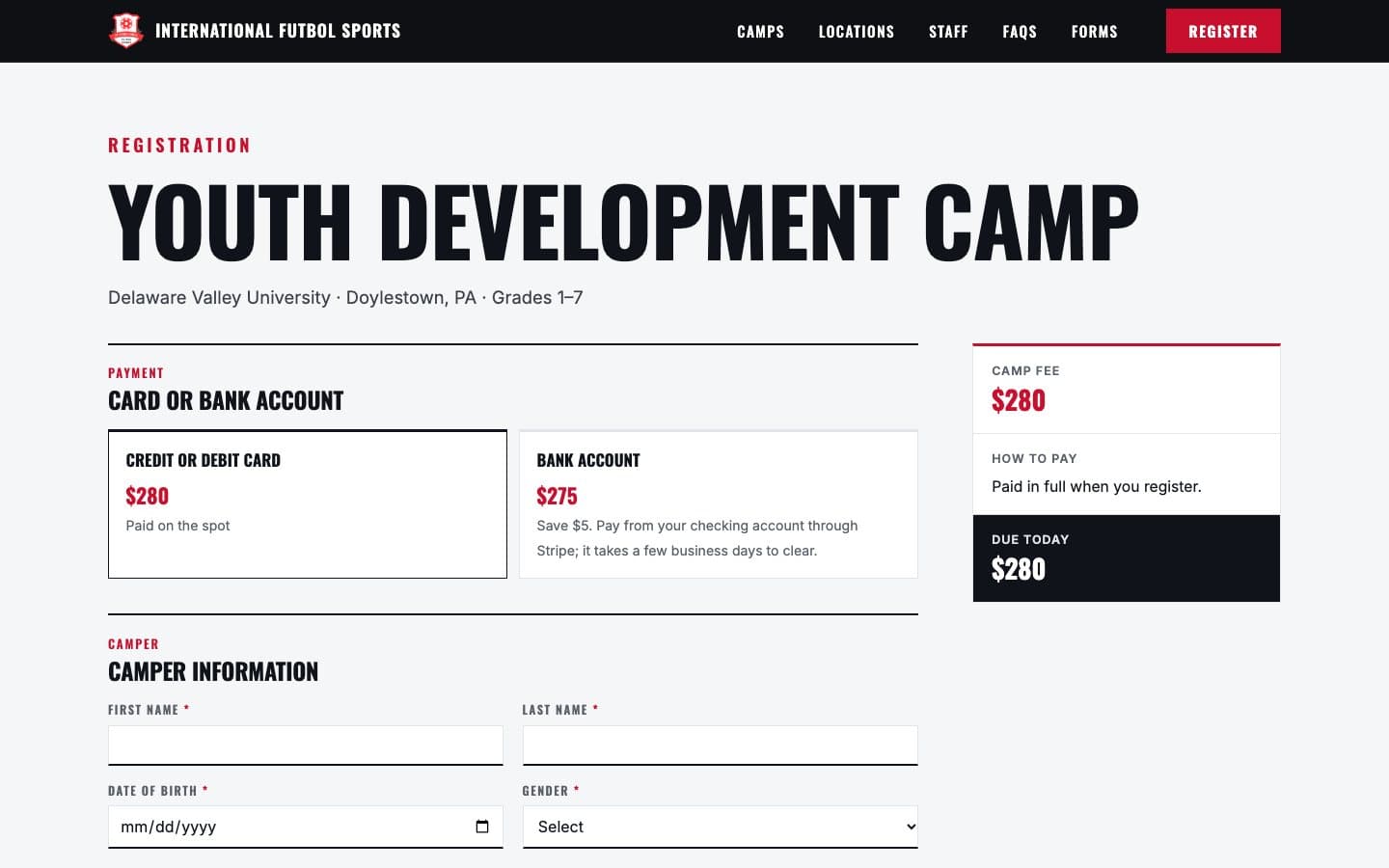
- A site that sells the camps and shows the price before a parent starts the form
- Registration and payment online, with the waiver accepted at sign-up
- Deposits that settle themselves, with the balance charged on the due date
- One admin where the office sees registrations, money and forms at a glance
- The camp's history brought across, so returning families and past seasons aren't lost
Our Approach
The goal was to make the chasing go away: money, forms and reminders handled by the system, not the office.
Website
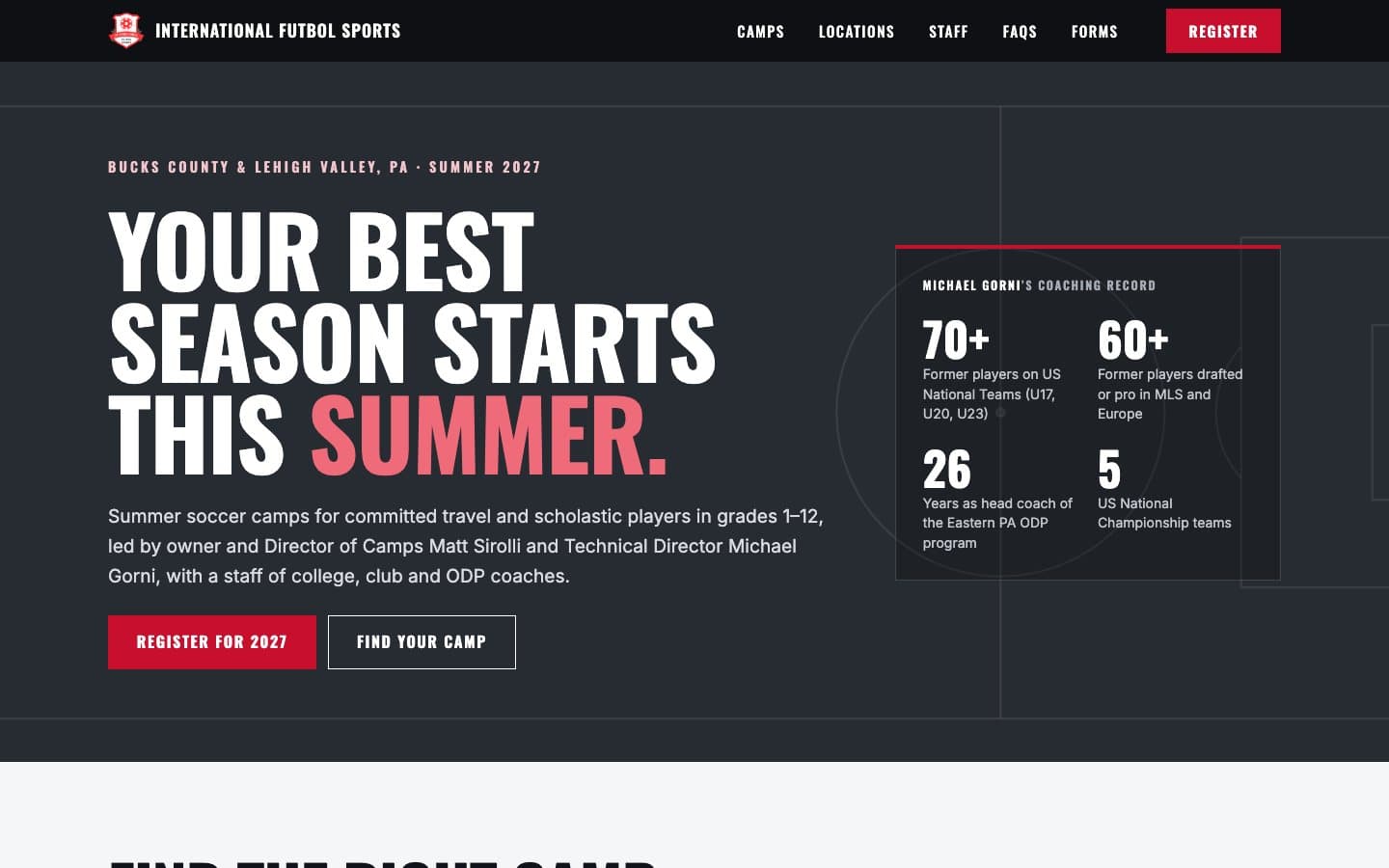
We rebuilt the public site with a black-and-red design taken from the IFS crest, and moved all the content across from WordPress: camps, staff and coach bios, FAQs and forms. Every old WordPress address redirects to its new page, so search rankings carry over. Camp dates, fees and capacity live in the database and are edited in the admin, so next year's update needs no developer.
Online Registration and Payments
- A registration form for each camp, with the price shown up front and a live “due today” summary.
- Secure checkout by card or bank account, with a discount for paying by bank. The camp's existing payment account moved onto the new platform.
- Pay in full, or pay a deposit on the residential camp. The deposit saves the card or bank account, and the balance is charged automatically on the due date. A reminder a month before says which card or account will be charged. If a charge fails, the parent gets a payment link and the office gets an alert. Checks are no longer accepted.
- Discount codes, capacity limits for each session, and returning campers recognized automatically.
- Unfinished checkouts and bank payments still clearing are tracked and followed up.
- The Player Code of Conduct and Waiver are accepted online at registration, with the parent's typed name, the time and the version of the text stored. The medical form is the only paper left.
The Camp Admin
Fifteen screens for the office, with sortable, filterable tables throughout. Camper information is visible only to signed-in camp staff.
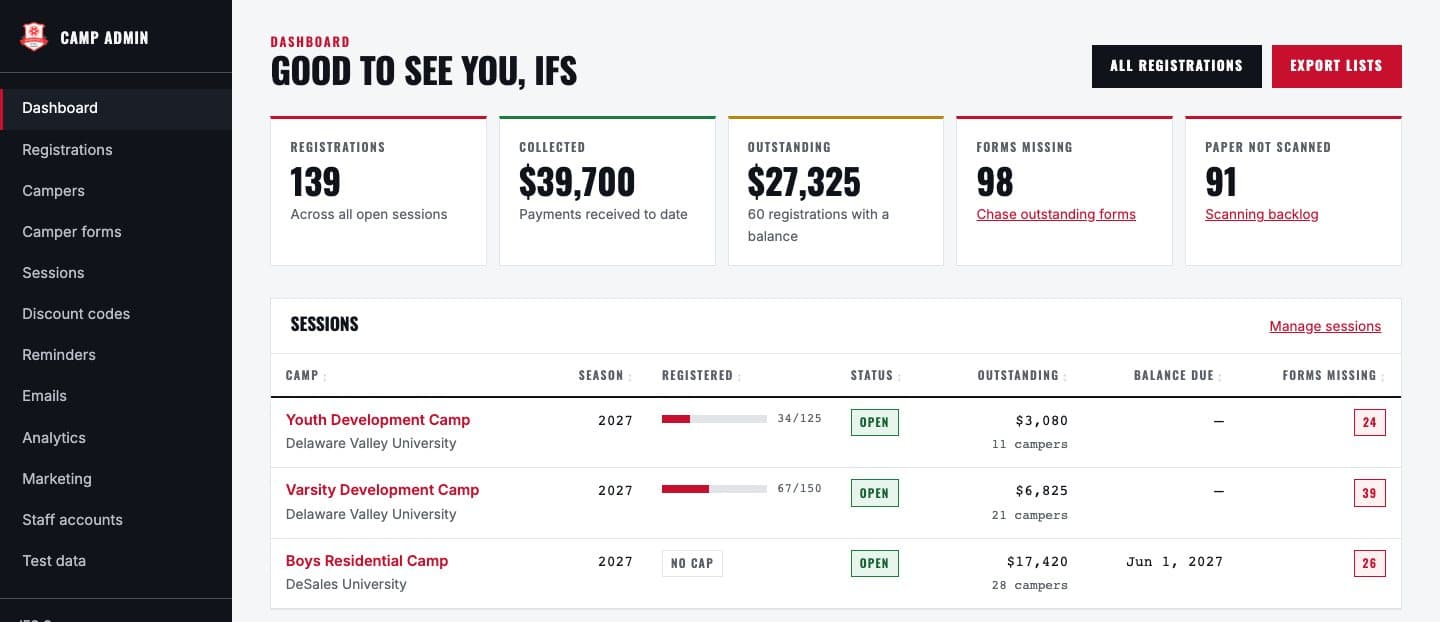
Dashboard
Registrations, money collected and outstanding, forms missing and the scanning backlog, plus a fill bar for each session.
Registrations and camper history
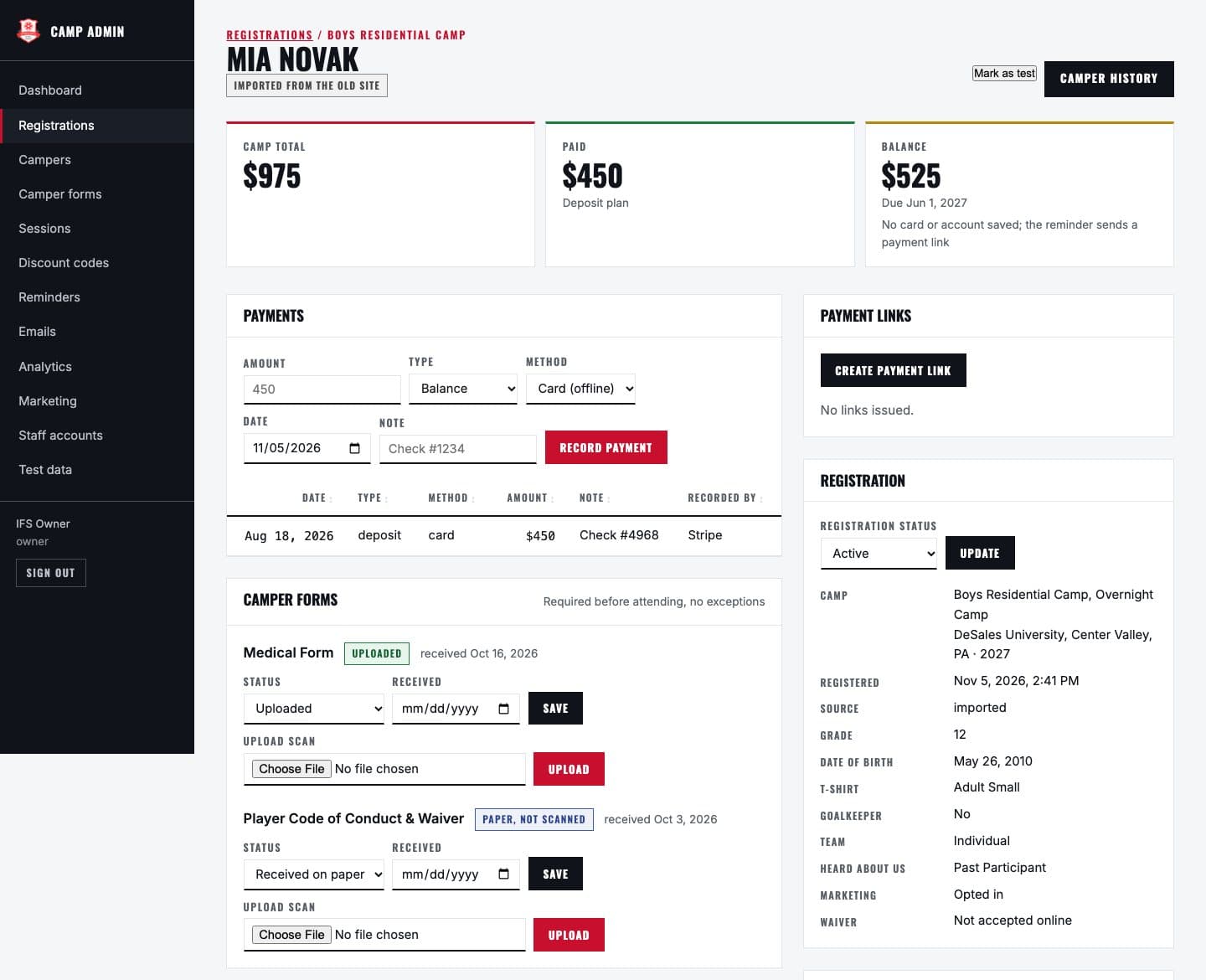
Every detail of a registration: payments, payment links, form status and scan uploads.
Camper forms
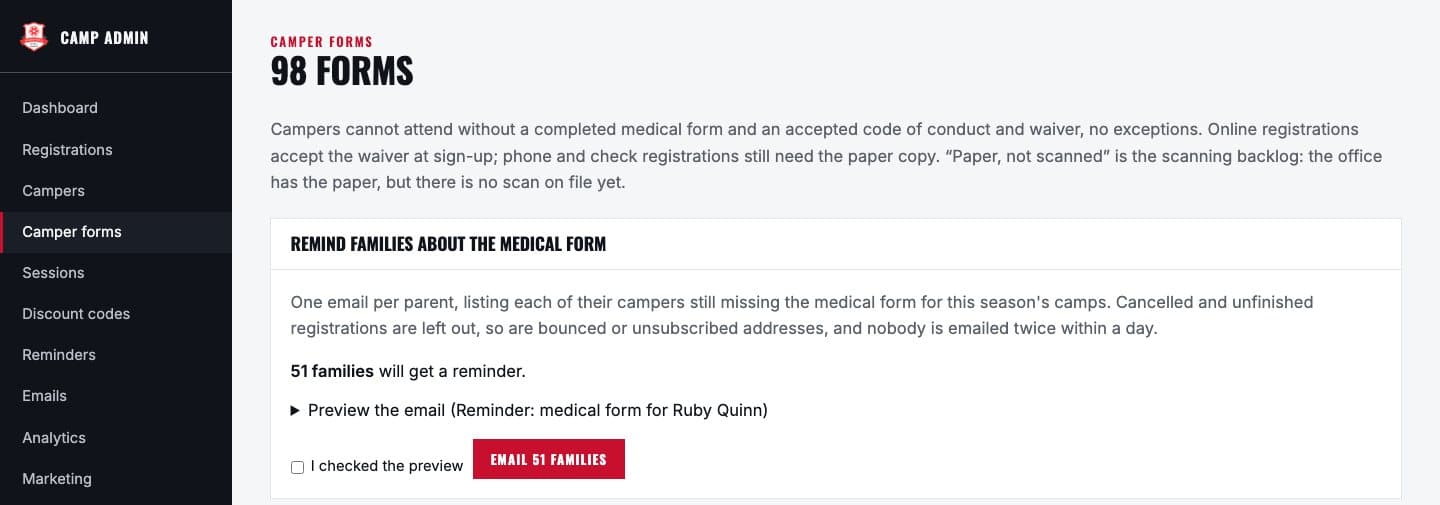
Compliance by camp and form, with a one-click medical form reminder: one email per family, covering all their campers.
Sessions and pricing
Dates, fees, options and capacity, with past seasons archived.
Reminders and emails
Reminder schedules the office writes itself, with a recipient preview and a send log, plus a scheduled registration summary.
Analytics
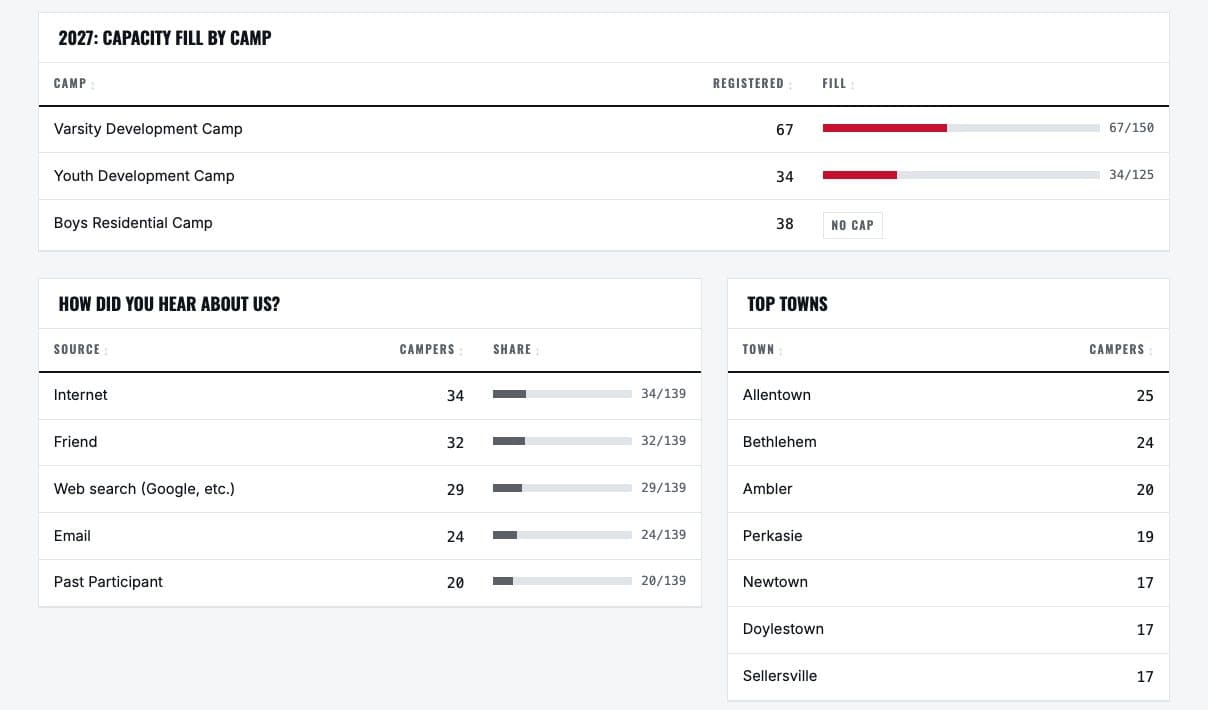
Registrations, money, returning rate, capacity fill, how families heard about IFS, top towns and grades, by year.
Marketing lists
CSV exports, one row per family, filtered by year, session, grade, town and payment status. Opt-outs and bounces are always dropped.
Staff accounts
Owners invite staff and control what each person can see and do.
Seventeen designed emails: confirmations for every way of paying, receipts, a bank payment cleared notice, “registration not finished”, failed payment notices, staff alerts and staff invites. All of them go out from the camp's own info@ address, and the office can send itself a test of any of them from the admin. Reminders and a registration summary go out automatically every day.
History and Data Migration
- The 2021 to 2026 seasons brought across from the old site: contact, camp and payment history only, with no medical or insurance details.
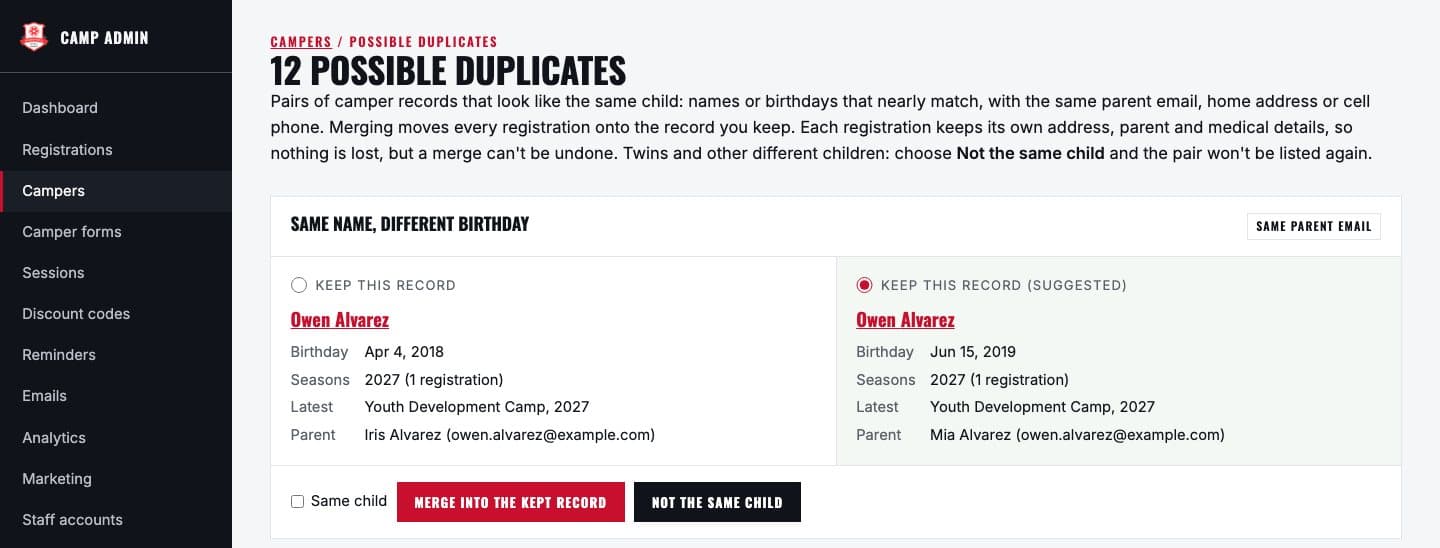
- Possible duplicate campers are shown side by side with “merge” and “not the same child” buttons, so six years of records become one history per child.
- Past seasons are archived: they feed analytics and returning-family matching, but stay out of the daily views.
Inside the Admin
What the camp office works in every day. Shown here with made-up demo data.
What We Delivered
Custom Website
Rebuilt site, WordPress content moved across, old addresses redirected
Online Registration
3 camps, price shown up front, waiver accepted online
Payments
Card or bank, a bank discount, deposits or pay in full
Automatic Balance Charging
Saved card or account charged on the due date, failures followed up
Camp Admin
15 screens: dashboard, registrations, forms, sessions, analytics, marketing, staff
Forms Tracking
Compliance view, scan uploads, one-click family reminders
17 designed emails, reminder schedules, a daily summary
Six Seasons of History
2021 to 2026 imported, duplicate campers merged
Privacy
Camper information visible only to camp staff
Hosting
Managed hosting, with reminders and summaries running daily
The Results
Ready for the 2027 Season
One Place to Run the Season
Registrations, money and forms on one dashboard, instead of spreadsheets.
Balances Settle Themselves
No checks and no chasing. A failed charge is flagged and followed up automatically.
Forms Chased in One Click
One email per family, and never twice in a day.
History Kept
Six seasons brought across, so returning families are recognized automatically.
No Developer Needed Next Year
- Dates, fees and capacity are edited in the admin
- Discount codes and reminder emails are written by the office
- Staff accounts and roles are managed by the owners
- Automated tests check every change before it goes live
Does Your Business Run on Spreadsheets?
If your office is chasing payments, forms or follow-ups by hand, we can build the system that does it for you.